
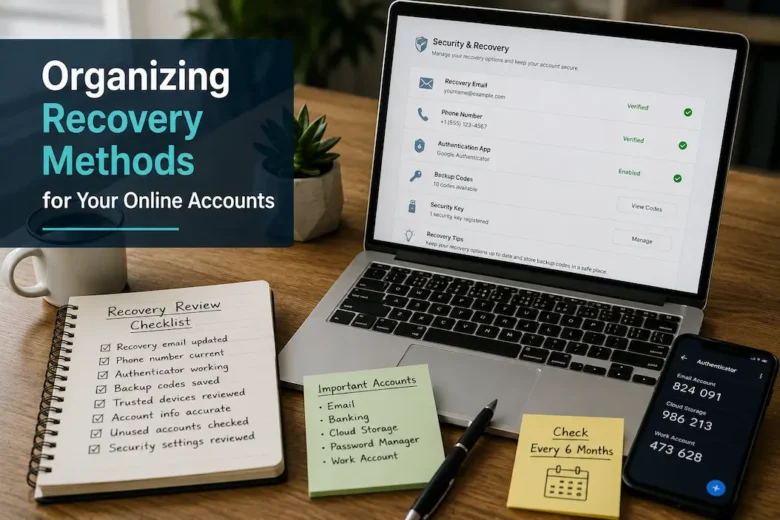
Getting locked out of an online account is frustrating, but the situation often becomes much worse when you realize the recovery information is outdated. The email address you used years ago no longer exists, the phone number has changed twice, and the authentication app was left behind on an old phone. Suddenly, proving that the account belongs to you is more difficult than remembering the password itself.
Most people think about passwords far more often than recovery options. Passwords are updated, stored in password managers, or written down somewhere secure, while recovery methods are rarely revisited after the day an account is created. Yet when access is interrupted, those forgotten recovery settings become the most important part of the entire account.
Instead of waiting until something goes wrong, it helps to organize recovery methods in the same way you organize important documents or financial records. Knowing where your recovery information is, confirming that it still works, and keeping it current can turn a stressful situation into a routine one.
Understand That Recovery Is More Than a Backup Email
Many websites now offer several ways to verify your identity. Some rely on a recovery email, others send a code by text message, while many support authentication apps, security keys, or one-time backup codes.
Because every service works differently, it’s easy to assume all your accounts can be recovered the same way. In reality, one account may depend entirely on an old phone number while another expects you to use an authentication app you installed years ago.
Rather than treating every account as identical, take time to understand which recovery methods each one actually supports.
A simple comparison makes hidden gaps easier to spot.
| Recovery Method | Common Purpose |
|---|---|
| Recovery email | Password resets and security alerts |
| Mobile number | Verification codes and identity checks |
| Authentication app | Two-step verification |
| Backup codes | Access when the usual method isn’t available |
| Security key | Hardware-based account verification |
When you know how each account can be recovered, you can prepare for problems before they happen.
Separate Your Most Important Accounts From Everything Else
Not every online account deserves the same level of attention.
An email account that receives password reset messages for dozens of other services is far more important than a website you visit once or twice a year. Likewise, your primary banking, shopping, cloud storage, and communication accounts often deserve more careful recovery planning than temporary registrations.
Instead of reviewing everything at once, begin with the accounts that would have the biggest impact if you couldn’t access them.
For many people, this includes:
- Primary email account.
- Cloud storage.
- Password manager.
- Banking and payment services.
- Frequently used communication platforms.
- Important work or business accounts.
Starting with these accounts creates a strong foundation because many other services depend on them in one way or another.
Create a Recovery Inventory Instead of Relying on Memory
Memory works well until it doesn’t.
Few people can confidently remember which recovery phone number is connected to every account they own, especially after several years of changing devices or email providers.
A practical solution is to maintain a simple recovery inventory.
Rather than recording passwords, focus on recovery details.
| Account | Recovery Email | Phone Number | Authentication App | Backup Codes Stored |
|---|---|---|---|---|
| Primary Email | ✓ | ✓ | ✓ | ✓ |
| Cloud Storage | ✓ | ✓ | ✓ | ✓ |
| Shopping Account | ✓ | ✓ | Optional | No |
| Community Forum | ✓ | No | No | No |
This overview makes it easy to identify accounts that depend on only one recovery method or still use outdated information.
Avoid Making One Recovery Method Your Only Option
It’s surprisingly common for several important accounts to depend on a single recovery email or one mobile phone.
While that may seem convenient, it also creates a single point of failure.
Imagine losing access to that email account or replacing your phone unexpectedly. If every account depends on the same recovery method, recovering one problem may require solving another first.
Whenever possible, enable more than one recovery option.
For example, you might combine:
- Recovery email.
- Mobile verification.
- Authentication app.
- Backup recovery codes.
Multiple recovery methods provide flexibility if one becomes temporarily unavailable.
Review Recovery Information After Major Life Changes
Recovery settings often become outdated for a simple reason: life changes.
People move to a new country, change mobile providers, graduate from school, leave an employer, or switch to a different email service. During those transitions, updating account recovery information is rarely the first task that comes to mind.
Instead of waiting until the next login problem, make recovery updates part of major personal or professional changes.
Any of these situations should prompt a review:
| Change | Why Review Recovery Settings? |
|---|---|
| New phone number | Text verification may stop working |
| New email address | Password resets may go to an inactive inbox |
| New phone | Authentication apps may need transferring |
| New computer | Trusted devices may change |
| Moving abroad | Regional verification options may differ |
Small updates completed at the right time are much easier than emergency recovery requests months later.
Keep Recovery Information Easy to Find—But Hard for Others to Access
A recovery plan only helps if you can locate it when needed.
Scattering account details across notebooks, old emails, screenshots, and sticky notes usually creates more confusion than security.
Instead, choose one secure location for recovery information and maintain it consistently.
Depending on your preferences, this might include:
- A password manager with secure notes.
- An encrypted digital document.
- A printed record stored with important paperwork.
- A secure personal records folder.
The objective isn’t simply storing information—it’s ensuring that you know exactly where it is whenever an unexpected account issue arises.
Think About Recovery Before Replacing Devices
Getting a new phone or computer is exciting, but inadequate preparation can result in an account that becomes impossible to recover.
Before discarding your old device, check for authentication apps, trusted login credentials, saved recovery codes, or account verification tools.
Transferring this information before resetting or selling the device usually takes very little time; recovering it later is far more difficult.
Planning before upgrading your device keeps your recovery methods accessible to you, rather than trapping them on hardware you no longer own.
Turn Recovery Into a Routine Instead of an Emergency
In most cases, recovery information is added once and then forgotten. Years go by; the account remains active, and there seems to be no obvious reason to change security settings. During this seemingly quiet period, it is easy to feel secure because everything appears normal.
Treat data recovery information like any other important document. Do not wait until your account is locked out; instead, perform a few quick checks each year.
Each check ensures that contact details are still correct and the chosen recovery method still works, while removing anything that no longer reflects your current situation.
This process requires no technical expertise; it simply turns a few ideas into confirmed facts.
Test the Recovery Process Before You Actually Need It
Having recovery methods listed on your account is helpful, but it’s equally important to know they still work.
That doesn’t mean intentionally locking yourself out. It simply means checking whether the recovery options remain accessible.
For example, you might:
- Confirm that you can sign in to your recovery email.
- Verify that your recovery phone number still receives messages.
- make authentication apps are functioning correctly.
- Please locate your backup recovery codes.
- Check that trusted devices are still available.
Think of it as testing a smoke alarm. You hope you’ll never need it, but you’ll feel much more confident knowing it’s ready if the situation changes.
Don’t Overlook Older Accounts
People naturally focus on the services they use every day, yet older accounts can be just as important.
Perhaps you joined an online forum years ago, opened a cloud storage account for one project, or created an account for shopping that you only use occasionally. Even if you rarely sign in, those accounts may still contain personal information, payment history, or saved documents.
Instead of ignoring them completely, include them in your occasional review.
You don’t necessarily need to update every setting, but it’s worth checking whether:
| Review Point | Why It Matters |
|---|---|
| Recovery email is still active | Password resets remain possible |
| Phone number is current | Verification messages reach you |
| Account is still needed | Unused accounts may no longer justify maintenance |
| Personal information is accurate | Keeps account details current |
Sometimes the best decision is to keep an account updated. Other times, removing an account you no longer need may simplify your overall digital organization.
Keep Recovery Information Consistent
One of the most common sources of confusion is inconsistency.
An account might use one email for logging in, another for password recovery, and a phone number that was replaced years ago. Individually, those details seem manageable, but together they make account recovery far more complicated than necessary.
Whenever practical, simplify your setup.
That doesn’t mean every account must use identical recovery methods. It simply means avoiding unnecessary variation that makes it difficult to remember where important notifications or verification requests will appear.
Consistency reduces the number of surprises during account recovery and makes long-term maintenance much easier.
Recognize When Recovery Information Needs Immediate Attention
Some updates can wait until your next scheduled review. Others deserve prompt action.
For example, don’t postpone reviewing recovery methods after:
- Changing your primary email address.
- Switching mobile phone numbers.
- Replacing a device that stores authentication apps.
- Receiving notifications about changes you didn’t make.
- Discovering that a recovery method is no longer accessible.
Addressing these situations while they’re fresh is usually much easier than trying to reconstruct account information months later.
Common Recovery Planning Mistakes
Many recovery difficulties begin with small decisions that seemed harmless at the time.
Being aware of these patterns makes them easier to avoid.
| Common Mistake | Better Habit |
|---|---|
| Depending on only one recovery method | Enable multiple recovery options when available |
| Forgetting to update recovery details after changing phone numbers | Review important accounts after major changes |
| Saving backup codes without knowing where they are | Store them in one secure, documented location |
| Assuming recovery settings never need attention | Review them regularly |
| Keeping recovery information scattered across different places | Maintain one secure, organized record |
None of these habits require advanced technical knowledge to improve. They simply require occasional attention.
A Practical Recovery Review Checklist
Rather than remembering everything individually, work through a short checklist whenever you review important accounts.
✓ Recovery email is active and accessible.
✓ Recovery phone number is current.
✓ Authentication app is working.
✓ Backup recovery codes are stored securely.
✓ Trusted devices are still in use.
✓ Personal account details are accurate.
✓ Unused accounts have been reviewed.
✓ Recovery record has been updated after recent changes.
Completing this review once or twice a year is often enough to keep recovery information reliable without turning it into an ongoing task.
Frequently Asked Questions
How often should I review account recovery methods?
For most people, reviewing important accounts every six months is a practical schedule. It’s also wise to update recovery settings immediately after changing your phone number, email address, or primary device.
Should every account have more than one recovery option?
If the platform supports multiple methods, having more than one option can make recovery much easier if one method becomes unavailable. The exact combination depends on the service and your personal preferences.
Is it safe to keep a record of recovery information?
It can be, provided it’s stored securely. Many people use a trusted password manager with secure notes or another protected storage method rather than keeping sensitive information in unprotected files.
What if I no longer have access to an old recovery email?
Please update it as soon as possible while you can still sign in to the account. Waiting until after access is lost usually complicates recovery.
Should I review accounts I rarely use?
Yes. Even infrequently used accounts may contain personal information or remain connected to other services. Including them in your periodic review helps ensure recovery details remain accurate.
Final Thoughts
Organizing recovery methods isn’t about preparing for the worst every day. It’s about reducing uncertainty before it has a chance to become a problem. When you keep recovery information current, store it securely, and review it occasionally, you make unexpected login issues much easier to resolve.
A well-organized recovery plan also grows with you. As you change devices, update contact information, or create new online accounts, taking a few minutes to review recovery settings keeps everything connected clearly and reliably. Over time, those small maintenance habits can save hours of frustration and help you regain access to important accounts with far greater confidence.