Privacy settings rarely remain unchanged over time. Social networks constantly add new features, alter settings, and sometimes even change how they share information. Meanwhile, your habits evolve, too. You might start discussing work rather than personal matters on the platform, join new groups, or share more photos than you did a year ago.
Because these changes happen gradually, it is natural to feel that your privacy settings still meet your needs, even when they no longer align with your preferences.
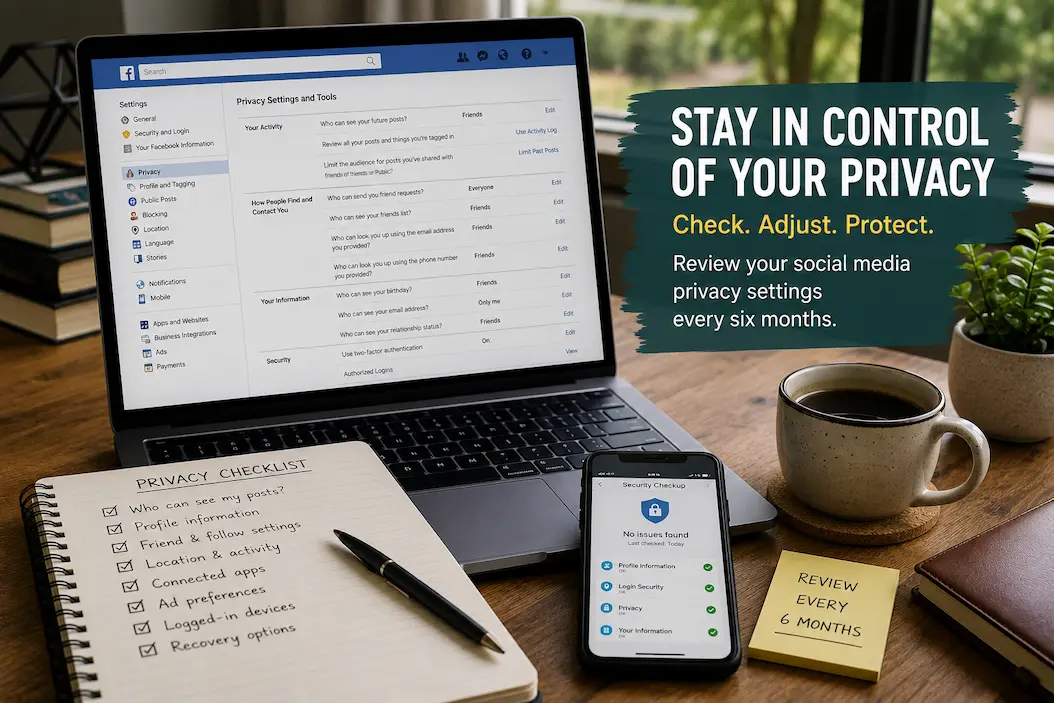
Rather than waiting for unexpected messages or personal information to appear where you do not want them, it is best to review your privacy settings twice a year. A check-up every six months requires little effort or technical expertise; it is simply an opportunity to ensure your account continues to function the way you want it to, rather than the way it did a few years ago.
Start With Your Current Sharing Habits
Before opening any privacy menu, think about how your relationship with the platform has changed.
Perhaps you created the account to stay in touch with friends but now use it for professional networking. Maybe you once shared daily updates but now post only occasionally. Some people become more comfortable sharing personal milestones, while others gradually prefer a smaller audience.
Your privacy settings should support your current habits rather than your past ones.
Ask yourself a few simple questions:
- Who do I expect to see my posts today?
- Am I comfortable with strangers viewing my profile?
- Has this account become more personal or more professional?
- Do I still use this platform for the same reason?
Answering these questions first makes reviewing the settings much more meaningful because you’re adjusting them based on your present needs instead of simply clicking through menus.
Review Who Can See Your Posts
The audience for your posts is one of the most important privacy settings on any social platform.
Sometimes the visibility changes because of a new feature. Other times, a different audience than usual sees an individual post, and that preference becomes the new default.
To ensure your posts reach the intended audience, please confirm the current audience settings instead of assuming every future post will reach the expected viewers.
Pay attention to options such as:
| Setting | Why Review It |
|---|---|
| Default audience | Controls who sees future posts |
| Past post visibility | Older content may still be public |
| Story visibility | Temporary posts often have separate controls |
| Photo albums | Individual albums may use different privacy settings |
| Tagged content | Review how shared content appears on your profile |
A few minutes spent checking these areas can prevent personal updates from reaching a wider audience than intended.
Check What Information Appears on Your Profile
Profiles often contain more information than people realize.
Depending on your settings, you may display phone numbers, email addresses, birthdays, workplace details, education history, hometowns, and relationship information differently.
Not every detail needs to be hidden. The goal is simply to decide whether each piece of information still belongs on your public profile.
As you review your profile, ask yourself:
- Is this information still accurate?
- Does everyone need to see it?
- Would I choose to publish it today if I were creating this account from scratch?
Viewing your profile from the perspective of someone who doesn’t know you often makes unnecessary public information much easier to spot.
Review Friend, Follower, and Connection Settings
Over time, social circles naturally change.
Former coworkers, classmates, clients, community groups, and acquaintances may stay connected long after you stop communicating regularly with them. That’s completely normal, but it’s worth reviewing whether your current privacy settings still make sense for your present network.
Rather than focusing on individual connections first, look at the broader controls.
For example, consider who can:
- Send friend or connection requests.
- Follow your public activity.
- View your connections or friend list.
- Mention or tag your profile.
- Locate your account using your email address or phone number.
Small adjustments in these settings can have a noticeable impact on how visible your profile is without affecting your everyday use of the platform.
Review Location and Activity Sharing
Many social platforms collect or display information related to your activity beyond the posts you publish.
Location history, nearby recommendations, activity status, check-ins, and similar features may reveal more about your routines than you realize.
You don’t necessarily need to disable every feature, but it’s worth deciding whether each one still provides enough value to justify sharing that information.
Think about questions like these:
- Do I still want people to know when I’m online?
- Am I comfortable sharing my location through posts or check-ins?
- Have I enabled features I no longer use?
- Does this setting improve my experience or simply collect more information?
Reviewing these options every six months helps ensure your privacy preferences keep pace with changes in both the platform and your own habits.
Look at Apps Connected to Your Account
Years of using a social platform often means years of connecting other services to it.
Games, shopping sites, scheduling tools, quizzes, productivity apps, and photo editors may all have been granted access at different times.
Some remain useful. Others may not have been opened for years.
Instead of assuming every connected application still deserves access, review them individually.
A useful approach is to ask:
| Question | Consideration |
|---|---|
| Do I still use this app? | If not, access may no longer be necessary. |
| What information can it access? | Some apps require more permissions than others. |
| Would removing it affect anything important? | Helps avoid disconnecting services you still need. |
| Do I remember authorizing it? | Unfamiliar connections deserve closer attention. |
Cleaning up unnecessary app connections reduces the amount of personal information shared beyond the platform itself.
Pay Attention to Privacy Settings Added Since Your Last Review
Social platforms rarely remain unchanged for long. New messaging features, profile options, audience controls, and account settings are introduced regularly. Some of these additions include privacy choices that didn’t exist when you originally configured your account.
Rather than assuming older settings automatically cover new features, look through sections that have been added or updated since your previous review.
A new feature isn’t automatically a privacy concern, but it’s worth understanding how it works before deciding whether to enable it.
Spending a few extra minutes exploring newly introduced settings can prevent surprises later, especially if the platform has expanded how information is shared or displayed.
Review Advertising and Personalization Preferences
Many people focus on who can view their posts but rarely check how their account information personalizes content and advertisements.
Most social platforms allow you to review at least some of these preferences. While the available options differ from one service to another, it’s worth understanding what information contributes to recommendations and personalized experiences.
During your review, you may find settings related to:
- Interests used for content recommendations.
- Advertising preferences.
- Information shared with advertising partners.
- Activity used to personalize your experience.
- Categories assigned to your account based on previous activity.
You don’t have to disable every personalization feature. The important part is making informed choices instead of relying on default settings that may have been enabled years ago.
Check How People Can Find Your Account
Not everyone wants their profile to appear in every search.
Depending on the platform, other people may be able to locate your account through your name, email address, phone number, mutual connections, or search engines.
Reviewing these discovery settings every six months helps ensure they still match your expectations.
Consider whether you’re comfortable with people finding your account through:
| Discovery Method | Questions to Consider |
|---|---|
| Name search | Should everyone be able to locate your profile? |
| Email address | Do you want contacts to find you this way? |
| Phone number | Is this still necessary? |
| Search engines | Should your public profile appear in search results? |
| Suggested connections | Are recommendation settings appropriate? |
These options don’t need to be identical across every platform. A professional networking account may benefit from broader visibility, while a personal profile may not.
Review Devices Logged Into Your Account
Privacy isn’t only about what other people can see. It’s also about knowing where your account is currently active.
Most major social platforms allow you to review recent logins or currently signed-in devices.
Take a few moments to look through the list.
If you notice an old laptop you’ve sold, a previous phone you’ve replaced, or a browser you no longer use, signing out of those sessions helps reduce unnecessary access.
Likewise, unfamiliar locations or devices deserve closer attention. While they don’t always indicate unauthorized access, they’re worth investigating before dismissing them.
Making this review part of your six-month routine helps keep account access organized as your devices change over time.
Remove Information You No Longer Want to Share
Privacy reviews aren’t limited to changing settings. They’re also an opportunity to look back at the information already attached to your account.
Old profile details, outdated employment information, expired contact details, or public posts that no longer reflect how you use the platform may still be visible.
Instead of trying to review years of content all at once, focus on the information that matters most today.
For example, you might update:
- Profile biography.
- Workplace or education details.
- Contact information.
- Public links.
- Older posts that are no longer appropriate for your intended audience.
Keeping your profile current improves both privacy and accuracy.
Common Privacy Habits Worth Rethinking
Many privacy issues don’t result from complicated technical problems. They develop through small habits repeated over time.
Here are a few examples:
| Habit | Better Approach |
|---|---|
| Accepting default settings without reviewing them | Check privacy options periodically |
| Leaving profile information unchanged for years | Remove or update outdated details |
| Connecting apps and never reviewing permissions | Remove services you no longer use |
| Ignoring new privacy features | Read new settings before enabling them |
| Assuming every platform works the same way | Review each account individually |
Privacy settings are rarely something you configure once and never revisit. Regular reviews keep them aligned with how you actually use each platform.
A Six-Month Privacy Review Checklist
A checklist makes it easier to stay consistent without trying to remember every setting.
Every six months, consider reviewing the following:
- Default audience for new posts.
- Visibility of older posts.
- Profile information.
- Friend, follower, or connection settings.
- Tagging and mention controls.
- Location and activity sharing.
- Connected applications.
- Advertising and personalization preferences.
- Logged-in devices.
- Recovery email and phone number.
Completing this review usually takes far less time than resolving an unexpected privacy concern later.
FAQs
Why should you check your privacy settings every six months?
Social networks constantly add new features, modify existing settings, and sometimes change how information is shared. By checking your settings twice a year, you ensure they still align with your preferences.
Should all social media accounts have the same privacy settings?
Not necessarily. Professional accounts may need to be easier to find, whereas personal accounts might require settings that restrict access for others. Review your privacy settings based on the purpose of each account.
How do privacy settings affect older posts?
On many websites, visibility settings for older posts may differ from those for newer ones. You should verify that older information is still being shared only with the audience you intend to reach.
Should I remove connected apps that I no longer use?
Yes. Apps you no longer use may still retain certain permissions. Regularly checking for and removing unnecessary connections limits the access others have to your account.
What if I don’t use social media very often?
Even accounts you rarely or never use can contain personal and account-recovery information. Regardless of how often you use these accounts, regularly reviewing privacy settings ensures they remain accurate and secure.
Conclusion
You cannot simply set your privacy preferences once and consider the job done. Social networks evolve, and your online habits change; settings that worked a few years ago may evolve, to suit the way you currently share information.
Every six months, you can review who sees your content, update outdated information, remove unnecessary app connections, and ensure your account is still functioning as intended. Don’t wait for unexpected messages, unnecessary connections, or privacy issues to arise; instead, check your privacy settings regularly. By spending just a few minutes a year, you can maintain control over your account.